Nintendo Switch accessories that earn their place: protect, charge and play longer
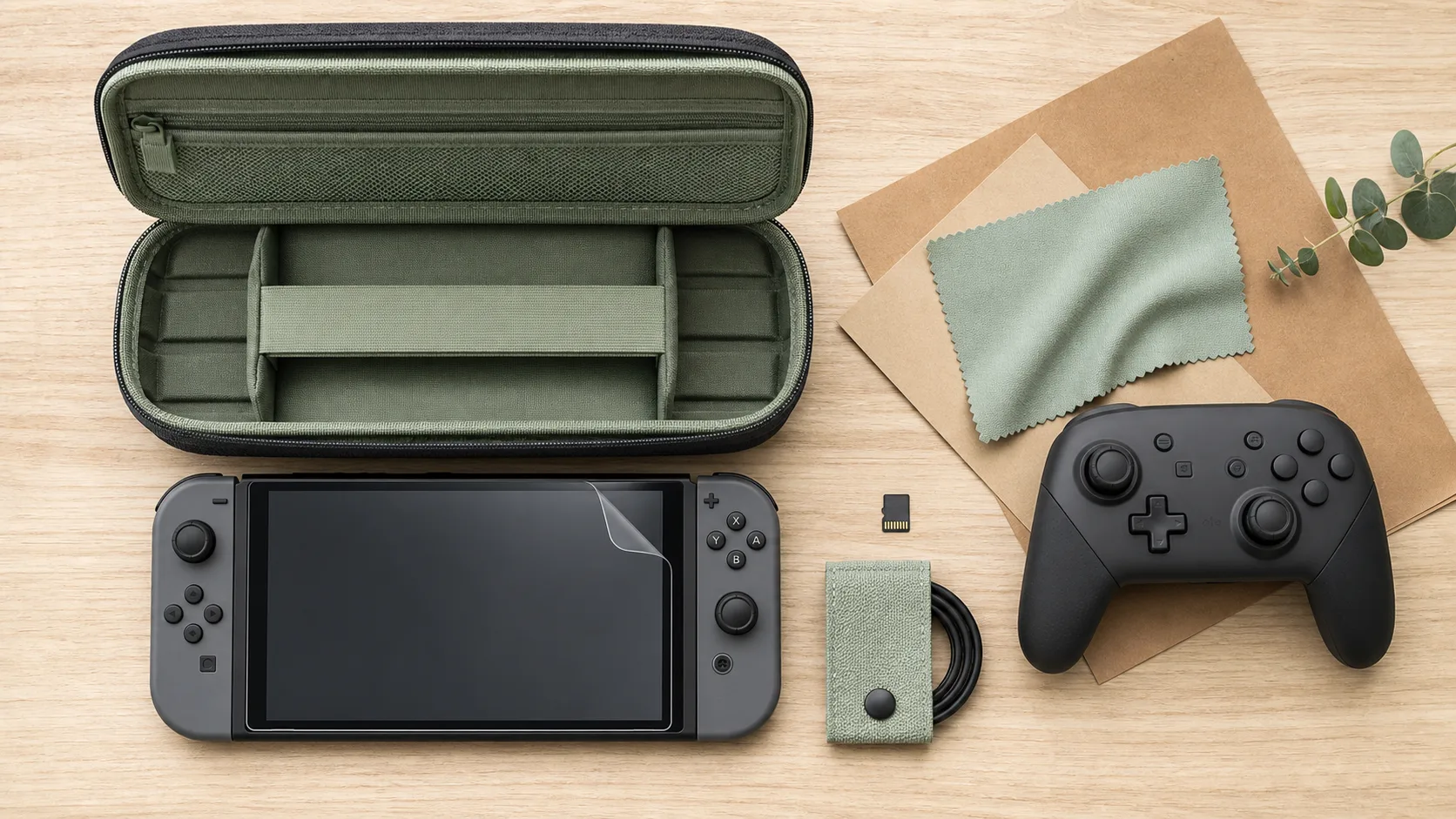
The right Nintendo Switch accessories are not the ones that fill a drawer. They are the ones that solve a problem you already have: a scratched screen, full storage, uncomfortable Joy-Con sessions, dead controllers before multiplayer night, messy cables or risky travel packing. Each accessory should make the console easier, safer or more enjoyable to use.
Whether you own a Nintendo Switch, Nintendo Switch OLED or Nintendo Switch Lite, the best choice depends on how you play, handheld, docked, tabletop, with kids, while traveling or mostly with digital games. Start with the essentials, then add comfort and convenience only where they make sense.
Quick comparison: which Nintendo Switch accessories are actually worth buying?
| Accessory | Best for | Works with | Priority |
|---|---|---|---|
| Tempered glass screen protector | Preventing scratches in handheld and travel use | Switch, Switch OLED, Switch Lite with model-specific size | Essential |
| Carrying case | Transporting the console, cables and game cards | Switch and OLED usually share many cases; Lite needs a smaller case | Essential for travel |
| microSD card | Digital games, DLC, screenshots and downloads | All Nintendo Switch models | Essential for digital libraries |
| Pro-style controller | Docked play and long sessions | Switch and OLED; Lite if paired wirelessly | High value |
| Joy-Con charging station | Families and local multiplayer | Joy-Con users | Useful if you own extra controllers |
| Power bank | Long trips and play away from outlets | All models via suitable USB-C charging | Travel upgrade |
| Playstand | Tabletop mode with a better viewing angle | Switch, OLED, Lite | Optional but practical |
If you are buying for someone else, the safest gifts are usually a screen protector, a case, a microSD card or a Nintendo Switch Pro Controller. They are easy to understand, useful for most players and less dependent on personal taste than headphones, skins or decorative grips.
Start with protection: screen, case and daily durability
Screen protector: the smallest accessory that prevents the most frustration
A tempered glass screen protector is one of the first accessories to buy, especially for handheld players and children. The Switch screen is handled constantly. It goes into a dock, slides into a case, rests on tables and travels in bags. A protector adds a replaceable layer between the display and everyday scratches, which is exactly where a practical upgrade should begin.
Check the model before buying. Nintendo Switch and Nintendo Switch OLED have different screen dimensions, and Nintendo Switch Lite uses its own smaller format. A protector that is slightly misaligned can lift at the edges or interfere with a case, so choose one clearly labeled for your console.
Carrying case: choose structure, not just style
A good carrying case should protect the console without becoming bulky. Look for a semi-rigid shell, soft interior lining, a secure strap or molded space for the console, and dedicated slots for game cards. If you carry a charger, earbuds or a compact stand, make sure the accessory pocket does not press directly against the analog sticks.
For home use, a slim case is often enough. For travel, choose a stronger case with room for a cable, power bank and physical games. For younger players, durability matters more than fashion: shock-resistant corners and a wipeable exterior are more useful than a decorative finish.
Protective shells and thumb grips: useful, but not always essential
Protective shells can help against scuffs and improve grip, but they may create compatibility issues with docks or tight cases. If you play mostly docked, make sure the shell is dockable or easy to remove. Thumb grips are inexpensive and can improve comfort, especially if the original sticks feel slippery, but they should fit tightly and not reduce control precision.
Storage and organization: avoid the hidden clutter problem
microSD card: the must-have for digital game buyers
MicroSD cards expand storage for digital games, downloadable content, updates, screenshots and videos. If you mainly buy physical cartridges and only install occasional updates, you can start smaller. If you buy from the Nintendo eShop often, storage fills quickly, so a larger card becomes more convenient and avoids constant deleting and redownloading.
Brands such as SanDisk and Samsung are common choices, but the key is to buy from a reliable seller and avoid suspiciously cheap cards. Counterfeit or low-quality memory cards can cause errors, slow transfers or lost convenience. For most players, dependable storage is more important than chasing the lowest price.
Game card cases and cable organizers: boring accessories that save time
A game card case is simple, but it prevents cartridges from ending up loose in backpacks, drawers or sofa cushions. For families, it also makes sharing easier: games return to one visible place instead of disappearing into multiple plastic boxes.
Cable organizers, small pouches and compact cases are especially useful if you travel with a charger, USB-C cable, earbuds and a stand. The goal is not a perfect-looking setup. It is to avoid the moment of panic when you cannot find the one cable or cartridge you need to play.
A simple buying order works best. Protect the screen and store your games first. Improve comfort only if your hands get tired. Add charging gear when battery management starts to annoy you. Bring in multiplayer and travel accessories once the setup already covers the basics. That sequence keeps the focus on real needs, not flashy bundles.
Controllers and comfort: what changes the way you play
Pro Controller or third-party wireless controller?
The Nintendo Switch Pro Controller is the safest premium choice for docked play and long sessions. It feels closer to a traditional console controller than separate Joy-Con, with fuller grips and larger buttons. It is especially worthwhile for action games, racing games, platformers and long RPG sessions where comfort matters.
Third-party controllers from brands such as PowerA, HORI or 8BitDo can offer better value, different shapes or features such as programmable buttons. The trade-off is that features vary: some models may lack vibration, NFC support or motion controls. Before buying, check which functions you actually use. A cheaper controller is not a bargain if it removes a feature your favorite game expects.
Grips for handheld mode
If you play mostly in handheld mode, an ergonomic grip can be more useful than a full controller. It adds handles to the console and reduces the flat, narrow feel of the Joy-Con. This is helpful for adults, players with larger hands and anyone who plays for more than short sessions.
For Nintendo Switch Lite, grips are especially popular because the controls are built into the console. For Switch and OLED, make sure the grip fits your exact model and does not block vents, buttons, cartridge access or charging. Some grips also include stands, which is convenient for tabletop mode.
Extra Joy-Con for families and multiplayer
Extra Joy-Con make sense if you often play local multiplayer. They are compact, easy to share and support many party games. However, for players who mainly play solo, a Pro-style controller usually provides better comfort for the money. Families may benefit from both: Joy-Con for group sessions and one full-size controller for longer single-player games.
Charging, power and safety: convenience without risking your console
Charging stations keep multiplayer ready
A Joy-Con charging station is useful when multiple controllers are in rotation. Instead of discovering that one pair is empty at the worst moment, you can leave them docked and visible. This matters most for families, shared living rooms and players who host local multiplayer often.
If you only use the Joy-Con attached to the console, a charging station may be unnecessary. The best accessory is the one that removes a repeated annoyance, not the one that looks good beside the TV.
USB-C chargers and power banks: check quality first
USB-C charging is convenient, but not every charger or dock is equally reassuring for a console. Choose well-made chargers and power banks from reputable brands, and look for clear compatibility information rather than vague claims. USB-C Power Delivery support can be useful, but the product should be designed for safe console charging, not just phone charging.
A power bank is most valuable for travel, commuting, long flights, hotel stays and handheld play away from outlets. If the console mostly stays in the dock at home, spend that money on a controller or storage first.
Be cautious with replacement docks
Third-party docks can be smaller and cheaper than official options, but they deserve extra caution. A dock is not just a plastic stand; it handles video output and power. If you want a compact travel dock, prioritize reputable brands, clear specifications and strong user feedback. When in doubt, official Nintendo accessories cost more but offer the most straightforward reassurance.
Match the accessory to the player: travel, kids, gifts and value
For travelers
Travelers should prioritize a protective case, screen protector, compact charger, power bank and possibly a foldable stand. Headphones or a low-latency Bluetooth audio setup can also improve play in shared spaces. Keep the kit light: the best travel setup is one you will actually carry.
For kids and families
For children, focus on durability and simplicity. A strong case, screen protector, game card organizer and extra controllers are more practical than decorative accessories. Charging stations also help adults keep controllers ready without searching under cushions or behind the TV.
For gift buyers
If you do not know the player’s exact habits, choose accessories with broad usefulness: microSD card, carrying case, screen protector, Pro-style controller or eShop gift card. Avoid model-specific shells unless you know whether they own a Nintendo Switch, Switch OLED or Switch Lite.
The smartest buying order is simple: protect the console first, expand storage if games are digital, improve comfort if sessions feel tiring, then add charging and multiplayer accessories when the household needs them. That approach keeps your setup useful, compatible and free from the clutter that many accessory bundles create.

- Robotique japonaise : derrière les humanoïdes, la puissance des usines - 23 octobre 2026
- Vacances en mai : du soleil, mais pas toujours une mer chaude - 22 octobre 2026
- Une workstation pour les charges professionnelles lourdes, pas pour le jeu - 21 octobre 2026
Articles qui pourraient vous intéresser :
 Guerre des consoles forum : comprendre, participer et garder son recul
 Nouveaux MMO : 4 sorties majeures et le calendrier des bêtas pour anticiper 2025-2026
 Pico 4 ou Meta Quest 3 : quel casque VR choisir selon votre usage ?
 XInput Wrapper, ScpToolkit ou MotionJoy : quel driver choisir pour une manette PS3 sur PC ?